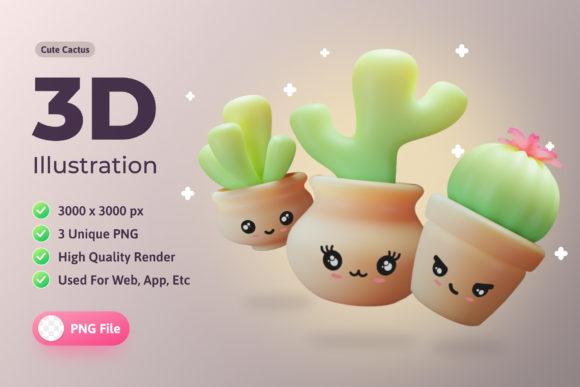
3D Illustration Plants Cute Cactus
Bringing a touch of charm and modern flair to digital design, 3D Illustration Plants Cute Cactus offers a fresh and versatile visual resource for creators across disciplines. Whether you're designing a mobile app, building a website, or crafting engaging infographics, these high-quality illustrations add personality and polish without overwhelming the user experience. Each illustration is rendered at 3000 x 3000 pixels, ensuring clarity and adaptability across a range of formats and screen sizes.
What makes this collection stand out is its balance of cuteness and professionalism. The cactus designs are expressive yet subtle, making them ideal for projects that need a friendly tone without veering into childish aesthetics. The 3D rendering gives depth and realism, allowing these illustrations to blend seamlessly into both minimalist and more detailed design schemes.
Applications Across Design Projects
The versatility of 3D Illustration Plants Cute Cactus makes it a go-to resource for a variety of creative needs. Here’s how different users can apply these illustrations effectively:
- UI/UX Designers can use the illustrations to enhance onboarding screens, empty states, or error pages, making the interface feel more approachable and human.
- Mobile App Developers can integrate these visuals into educational apps, wellness trackers, or plant-themed games to create a warm, engaging atmosphere.
- Bloggers and Content Creators can use them to break up text-heavy posts, especially in lifestyle, gardening, or productivity niches.
- Educators and Course Creators might find them useful for designing digital flashcards, progress trackers, or gamified learning platforms.
Because each illustration is delivered as a transparent PNG file, integrating them into different backgrounds and color schemes is straightforward. This makes them especially useful for responsive web design or multi-platform branding projects where consistency is key.
Creative Possibilities and Style Variations
While the cactus theme is consistent, the illustrations can be interpreted and applied in many different ways. Here are a few creative directions to explore:
- Thematic Storytelling – Use a series of cactus illustrations to represent different moods or stages in a user journey, such as growth, resilience, or transformation.
- Seasonal or Holiday Themes – Pair the illustrations with seasonal backgrounds or accessories (like tiny hats or holiday lights) to keep your design fresh throughout the year.
- Brand Mascot Integration – If your brand has a playful or approachable tone, a cactus character can become a recurring visual element across marketing materials, social media, and packaging.
- Interactive Animations – Use the PNG files as base assets for animations in web or app interfaces. A cactus that "grows" as users complete tasks can be a fun way to encourage engagement.
Designers can also layer these illustrations with other graphic elements or apply filters and overlays to match a specific color palette or mood. This flexibility allows for a cohesive look across different platforms while maintaining a sense of originality.
Adapting for Different Audiences and Formats
One of the strengths of 3D Illustration Plants Cute Cactus is its universal appeal. However, subtle tweaks can help tailor the illustrations to different audiences:
- For children’s apps or educational tools, pair the cacti with bright colors and playful fonts to create a whimsical environment.
- In professional wellness or productivity apps, use muted tones and clean layouts to maintain a sense of calm and focus.
- For ecommerce or lifestyle brands, integrate the cactus visuals into packaging, social media posts, or branded merchandise to reinforce a consistent aesthetic.
When adapting these illustrations across platforms, it’s important to maintain visual consistency. For example, if you’re using cactus illustrations in both a mobile app and a website, ensure they share similar proportions, lighting, and stylistic elements. This creates a unified brand language that users can easily recognize and connect with.
Practical Tips for Effective Use
To make the most of 3D Illustration Plants Cute Cactus, consider the following practical tips:
- Balance Visual Weight – Don’t let the illustrations overpower your layout. Use whitespace and thoughtful placement to ensure they enhance rather than distract from your content.
- Use Consistent Scaling – When using multiple illustrations, keep their scale consistent unless you’re intentionally creating a visual hierarchy.
- Optimize for Performance – Even though the files are high-resolution, compress them appropriately for web use to maintain fast load times without sacrificing quality.
- Pair with Complementary Typography – Choose fonts that match the tone of the illustrations—playful, modern, or elegant—to create a cohesive visual experience.
Also, consider how the illustrations will appear on different devices. A cactus that looks adorable on a desktop screen might appear too small or cluttered on a mobile device. Always test your designs across platforms to ensure optimal readability and visual impact.
Final Thoughts
3D Illustration Plants Cute Cactus isn’t just another design asset—it's a versatile tool that can elevate your creative projects with minimal effort. Whether you're a UI/UX designer, marketer, educator, or small business owner, these illustrations offer a simple yet powerful way to connect with your audience through visual storytelling. By applying them thoughtfully and creatively, you can enhance user engagement, reinforce brand identity, and bring a touch of warmth to your digital spaces.