How to Use the PESTLE Analysis PowerPoint Template to Enhance Strategic Presentations
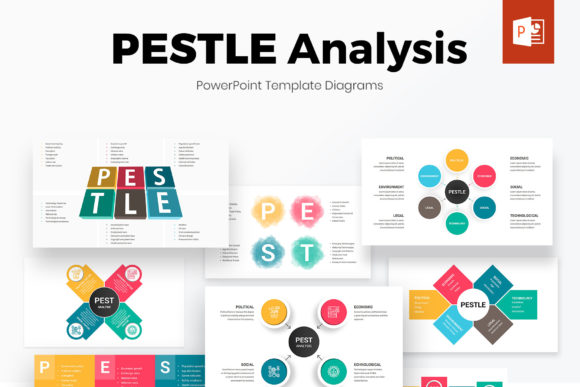
Creating a compelling presentation that communicates strategic insights clearly is essential for professionals across industries. The PESTLE Analysis PowerPoint Template offers a structured, visually engaging way to present macro-environmental factors affecting a business, project, or market. Whether you're preparing for a board meeting, investor pitch, or internal strategy session, this template streamlines the process of organizing and visualizing data through infographics, diagrams, and color-coordinated layouts.
Understanding the Role of PESTLE Analysis in Strategic Planning
PESTLE analysis is a framework used to evaluate external factors influencing an organization: Political, Economic, Social, Technological, Legal, and Environmental. It's often used alongside SWOT analysis to provide a broader context for strategic decision-making. The PESTLE Analysis PowerPoint Template transforms this analytical framework into a visual format, making it easier for audiences to grasp complex ideas quickly.
This template is especially useful in the early stages of strategic planning, where understanding the external landscape is crucial. It can also be referenced during project execution or after major decisions to reassess the environment and adjust strategies accordingly.
When to Use the PESTLE Analysis PowerPoint Template
- Before a project: To assess the external environment and inform strategic direction.
- Durring execution: To monitor changes in the market or regulatory landscape that may affect outcomes.
- After a decision or milestone: To reflect on how external factors influenced results and refine future planning.
Key Features That Make This Template Stand Out
With 35 fully editable slides, the PESTLE Analysis PowerPoint Template provides flexibility and design consistency. It includes a rich set of infographics, icons, and diagrams that help visualize data in a professional and engaging way. Here are some of its standout features:
- Over 6500 professional icons – easily changeable in size and color to match your branding.
- 90 pre-built color themes – apply a cohesive look across all slides with a single click.
- Two aspect ratios (4:3 and 16:9) – choose based on your presentation platform or screen format.
- Customizable color themes – create and apply your own brand colors across all slides instantly.
- Free fonts and icons – ensuring your presentation remains visually consistent and royalty-free.
How to Integrate the Template into Your Workflow
Integrating the PESTLE Analysis PowerPoint Template into your presentation workflow can significantly reduce preparation time while improving the quality of your output. Here’s how it fits into a typical process:
- Data Collection – Gather relevant external factors from market research, industry reports, and stakeholder input.
- Content Structuring – Use the template’s predefined layouts to organize each PESTLE category with clarity.
- Visual Enhancement – Insert icons and diagrams to make each point more digestible and visually appealing.
- Color and Branding – Apply your company’s color scheme using the built-in themes or custom settings.
- Final Review and Delivery – Ensure consistency, clarity, and alignment with your overall message before presenting.
Enhancing Usability and Efficiency
The PESTLE Analysis PowerPoint Template is designed with usability in mind. Its drag-and-drop interface allows users to move, resize, and recolor elements without breaking the design flow. Whether you're a seasoned presenter or new to data visualization, the template simplifies the process of turning raw insights into polished slides.
One of its most powerful features is the ability to apply a color theme across all slides with a single click. This ensures brand consistency and saves time when making design updates. Additionally, the compatibility with both 4:3 and 16:9 aspect ratios makes it adaptable for different presentation formats, from in-person meetings to digital webinars.
Workflow Examples and Practical Tips
Consider a marketing team preparing a campaign strategy for a new product launch. They might use the PESTLE Analysis PowerPoint Template to outline how political regulations, economic trends, and social behaviors could influence the campaign’s success. By visually mapping these factors, they can better align their messaging and timing with external conditions.
Here are a few practical tips for maximizing the template’s potential:
- Use icons strategically – Match each PESTLE category with a corresponding icon for visual consistency.
- Group related factors – Combine similar insights under each category to avoid clutter and improve readability.
- Update regularly – Reuse the template for ongoing reviews to track how external conditions evolve over time.
- Link to other tools – Import data from spreadsheets or analytics platforms to ensure accuracy and reduce manual entry.
Ensuring Consistency and Quality Control
Maintaining a consistent look and feel across presentations is essential for professional credibility. The PESTLE Analysis PowerPoint Template supports this by offering pre-designed layouts and one-click styling options. These features help avoid the common pitfalls of inconsistent fonts, colors, and spacing that can distract from your message.
For teams or organizations that produce frequent presentations, establishing a standard design protocol using this template can streamline quality control. By saving custom themes and slide masters, multiple users can collaborate efficiently while maintaining a unified visual identity.
Long-Term Use and Adaptability
As your business needs evolve, so too can your use of the PESTLE Analysis PowerPoint Template. Its modular design allows you to repurpose slides for different audiences or combine them with other presentation elements. Whether you're adapting the template for a PEST analysis, a SWOT breakdown, or a competitive landscape review, its flexibility ensures it remains a valuable asset over time.
Additionally, the inclusion of 6500 icons and multiple diagram styles means the template can grow with your content needs. As new trends or tools emerge, you can update your slides to reflect current best practices without needing to start from scratch.
Final Thoughts: Making the Most of Visual Strategy Tools
The PESTLE Analysis PowerPoint Template is more than just a design tool — it's a strategic asset that enhances clarity, engagement, and efficiency in professional communication. By integrating it into your planning and presentation workflows, you can ensure that your insights are not only well-researched but also effectively communicated.
Whether you're preparing for a high-stakes meeting or developing internal training materials, this template provides the structure and flexibility needed to present complex data with confidence. Its combination of visual appeal, ease of use, and long-term adaptability makes it a smart choice for anyone looking to elevate their presentation game.